# hCAPTCHA

hCaptcha là một loại captcha khá mới thực sự giống với reCAPTCHA và trông giống như sau:<br>

![](https://content.gitbook.com/content/aiWdIa3pJ7tiyJ3OnlF8/blobs/HM14TK8dyA90b1B8OTQt/image.png) ![](https://content.gitbook.com/content/aiWdIa3pJ7tiyJ3OnlF8/blobs/9hhQY1DPcVM4SGkMPZmk/image.png)

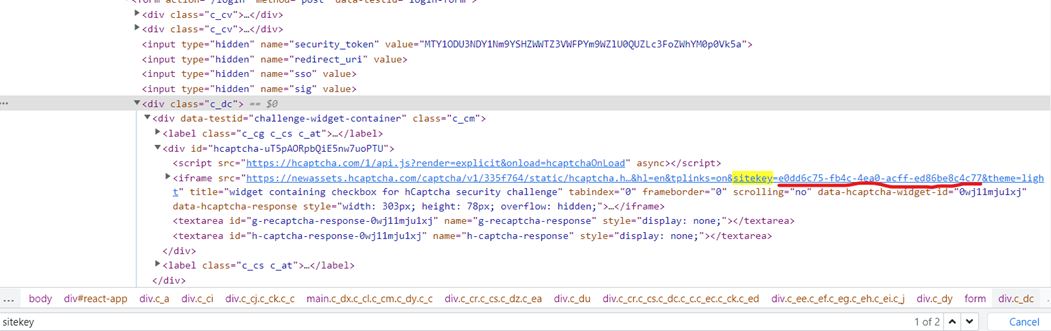
### 1. Tìm data-sitekey của hCAPTCHA

Đầu tiên, bạn cần tìm giá trị của tham số <mark style="color:red;">`data-sitekey`</mark> trong mã nguồn của trang web chứa hCAPTCHA. Mở bảng điều khiển dành cho nhà phát triển trong trình duyệt của bạn và tìm phần tử có thuộc tính <mark style="color:red;">`data-sitekey`</mark>

```
<div class="h-captcha" data-sitekey="f7de0da3-3303-44e8-ab48-fa32ff8ccc7b" id="hcaptcha"></div>
```

<figure><img src="https://content.gitbook.com/content/aiWdIa3pJ7tiyJ3OnlF8/blobs/8o1arOOVt4FPubPyN0RQ/image.png" alt=""><figcaption></figcaption></figure>

### 2. Tạo yêu cầu/Request

<mark style="color:red;">**POST :**</mark> <mark style="color:red;"></mark><mark style="color:red;">`https://anticaptcha.top/in.php`</mark>

**Các tham số Body**:

<table data-header-hidden><thead><tr><th width="161">Tên trường dữ liệu</th><th width="131"></th><th width="105"></th><th></th></tr></thead><tbody><tr><td><strong>Tên trường dữ liệu</strong></td><td><strong>Kiểu dữ liệu</strong></td><td><strong>Bắt buộc</strong></td><td><strong>Mô tả</strong></td></tr><tr><td>key</td><td>String</td><td>x</td><td>Key duy nhất để xác định đối tác API</td></tr><tr><td>method</td><td>String</td><td>x</td><td>Giá trị: <mark style="color:red;"><strong>hcaptcha</strong></mark></td></tr><tr><td>sitekey</td><td>String</td><td>x</td><td><p>Data-</p><p>sitekey hCaptcha cần view code url chứa hCaptcha để lấy sitekey</p></td></tr><tr><td>pageurl</td><td>String</td><td>x</td><td>url của webpage hiển thị hcaptcha mà bạn muốn giải<br>Ví dụ: <a href="https://il9p1l.csb.app/">https://il9p1l.csb.app</a><br><a href="https://accounts.hcaptcha.com/demo">https://accounts.hcaptcha.com/demo</a></td></tr><tr><td>invisible</td><td>Integer</td><td></td><td>invisible hCAPTCHA<br><mark style="color:red;"><strong>1</strong></mark>: Có<br><mark style="color:red;"><strong>0</strong></mark>: Không<br>Giá trị mặc định: <mark style="color:red;">0</mark><br><br>Nếu trong url iframe của hcaptcha bạn thấy có [ <strong>&#x26;size=invisible</strong> ] thì cần truyền invisible = 1</td></tr><tr><td>json</td><td>Interger</td><td></td><td><mark style="color:red;"><strong>0</strong></mark>: server sẽ trả về dạng text (mặc định)<br><mark style="color:red;"><strong>1</strong></mark>: server sẽ trả về dạng JSON</td></tr><tr><td>proxy</td><td>String</td><td></td><td>Định dạng ip:port:username:password<br><em>Nếu truyền dạng này thì ko cần truyền các trường dữ liệu proxy ở dưới nữa</em></td></tr><tr><td>proxyType</td><td>String</td><td></td><td>Kiểu Proxy:<br><strong>http</strong><br><strong>https</strong><br><strong>socks5</strong></td></tr><tr><td>proxyAddress</td><td>String</td><td></td><td>địa chỉ IP hoặc hostname của Proxy<br>Ví dụ: 103.124.95.45</td></tr><tr><td>proxyPort</td><td>String</td><td></td><td>Proxy port<br>Ví dụ: 8686</td></tr><tr><td>proxyLogin</td><td>String</td><td></td><td>Username proxy nếu có</td></tr><tr><td>proxyPassword</td><td>String</td><td></td><td>Password proxy nếu có</td></tr></tbody></table>

```http
POST HTTP
Url: https://anticaptcha.top/in.php
Content-Type: application/json

{
	"key": "YOUR_API_KEY",
	"method": "hcaptcha", // id cho hCAPTCHA
	"sitekey": "d121ad2d-b38b-4398-84ec-acd9633d5119", // thay bằng sitekey của bạn
	"pageurl": "https://il9p1l.csb.app" // thay bằng url của bạn
}
```

### Kết quả trả về/Response

{% tabs %}
{% tab title="Thành công" %}

```json
dạng text: OK|[id]
Ví dụ: OK|24380238

dạng JSON
{
	"status": 1,
	"request": "24380427", //task id
}
```

{% endtab %}

{% tab title="Thất bại" %}

```json
{
	"status": 0,
	"request": "Apikey incorrect"
}
```

hoặc

```json
{
	"status": 0,
	"request": "Balance not enough"
}
```

{% endtab %}
{% endtabs %}

### 3. Lấy kết quả giải captcha/Response

<mark style="color:red;">**GET :**</mark> <mark style="color:red;"></mark><mark style="color:red;">`https://anticaptcha.top/res.php`</mark>

**Các tham số Body**:

<table data-header-hidden><thead><tr><th width="197">Tên trường dữ liệu</th><th width="134"></th><th width="105"></th><th></th></tr></thead><tbody><tr><td><strong>Tên trường dữ liệu</strong></td><td><strong>Kiểu dữ liệu</strong></td><td><strong>Bắt buộc</strong></td><td><strong>Mô tả</strong></td></tr><tr><td>key</td><td>String</td><td>x</td><td>Key duy nhất để xác định đối tác API</td></tr><tr><td>id</td><td>String</td><td>x</td><td>Task id trả về ở bước 1</td></tr><tr><td>json</td><td>Integer</td><td></td><td><mark style="color:red;"><strong>0</strong></mark>: server sẽ trả về dạng text (mặc định)<br><mark style="color:red;"><strong>1</strong></mark>: server sẽ trả về dạng JSON</td></tr></tbody></table>

```http
GET HTTP
Url: https://anticaptcha.top/res.php?key=[apikey của bạn]&id=[task id]&json=1
```

### Kết quả trả về/Response

{% tabs %}
{% tab title="Đang xử lý" %}

```json
{
	"status": 0,
	"request": "CAPCHA_NOT_READY"
}
```

{% endtab %}

{% tab title="Thành công" %}

```json
dạng text: OK|[kết quả giải ra]
Ví dụ: OK|03AFcWeA7OjvYPKyn4iQv-7qnAFn6CxB6v50IQnQN_7Hng3OLKglKV...

dạng JSON
{
	"status": 1,
	"request": "03AFcWeA7OjvYPKyn4iQv-7qnAFn6CxB6v50IQnQN_7Hng3OLKg..." //kết quả giải captcha
}
```

{% endtab %}

{% tab title="Thất bại" %}

```json
{
	"status": 0,
	"request": "Apikey incorrect"
}
```

hoặc

```json
{
	"status": 0,
	"request": "Id does not exist"
}
```

{% endtab %}
{% endtabs %}

### 4. Code mẫu

{% tabs %}
{% tab title="C#" %}

```csharp
var client = new HttpClient();
var request = new HttpRequestMessage(HttpMethod.Post, "https://anticaptcha.top/in.php");
var content = new StringContent("{\r\n    \"key\": \"[api key]\",\r\n    \"method\": \"hcaptcha\",\r\n    \"sitekey\": \"d121ad2d-b38b-4398-84ec-acd9633d5119\",\r\n    \"pageurl\": \"https://il9p1l.csb.app\"\r\n}", null, "application/json");
request.Content = content;
var response = await client.SendAsync(request);
response.EnsureSuccessStatusCode();
Console.WriteLine(await response.Content.ReadAsStringAsync());
```

{% endtab %}

{% tab title="PHP Curl" %}

```php
<?php
$curl = curl_init();
curl_setopt_array($curl, array(
  CURLOPT_URL => 'https://anticaptcha.top/in.php',
  CURLOPT_RETURNTRANSFER => true,
  CURLOPT_ENCODING => '',
  CURLOPT_MAXREDIRS => 10,
  CURLOPT_TIMEOUT => 0,
  CURLOPT_FOLLOWLOCATION => true,
  CURLOPT_HTTP_VERSION => CURL_HTTP_VERSION_1_1,
  CURLOPT_CUSTOMREQUEST => 'POST',
  CURLOPT_POSTFIELDS =>'{
    "key": "[api key]",
    "method": "hcaptcha",
    "sitekey": "d121ad2d-b38b-4398-84ec-acd9633d5119",
    "pageurl": "https://il9p1l.csb.app"
}',
  CURLOPT_HTTPHEADER => array('Content-Type: application/json'),
));
$response = curl_exec($curl);
curl_close($curl);
echo $response;
?>
```

{% endtab %}

{% tab title="Javascript Jquery AJAX" %}

```javascript
var settings = {
  "url": "https://anticaptcha.top/in.php",
  "method": "POST",
  "timeout": 0,
  "headers": {
    "Content-Type": "application/json"
  },
  "data": JSON.stringify({
    "key": "[api key]",
    "method": "hcaptcha",
    "sitekey": "d121ad2d-b38b-4398-84ec-acd9633d5119",
    "pageurl": "https://il9p1l.csb.app"
  }),
};

$.ajax(settings).done(function (response) {
  console.log(response);
});
```

{% endtab %}

{% tab title="Python" %}

```python
import requests
import json

url = "https://anticaptcha.top/in.php"
payload = json.dumps({
  "key": "[api key]",
  "method": "hcaptcha",
  "sitekey": "d121ad2d-b38b-4398-84ec-acd9633d5119",
  "pageurl": "https://il9p1l.csb.app"
headers = {
  'Content-Type': 'application/json'
}
response = requests.request("POST", url, headers=headers, data=payload)
print(response.text)
```

{% endtab %}

{% tab title="NodeJS" %}

```javascript
var request = require('request');
var options = {
  'method': 'POST',
  'url': 'https://anticaptcha.top/in.php',
  'headers': {
    'Content-Type': 'application/json'
  },
  body: JSON.stringify({
    "key": "[api key]",
    "method": "hcaptcha",
    "sitekey": "d121ad2d-b38b-4398-84ec-acd9633d5119",
    "pageurl": "https://il9p1l.csb.app"
  })

};
request(options, function (error, response) {
  if (error) throw new Error(error);
  console.log(response.body);
}
```

{% endtab %}
{% endtabs %}

### 5. Sử dụng kết quả token nhận được

#### 5.1. Vượt hCAPTCHA dạng click

![](https://content.gitbook.com/content/aiWdIa3pJ7tiyJ3OnlF8/blobs/HM14TK8dyA90b1B8OTQt/image.png)

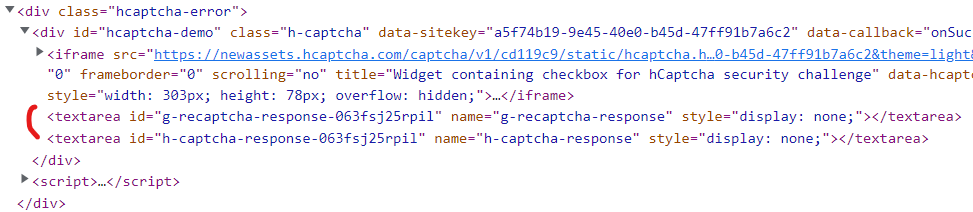
Định vị phần tử có id h-captcha-response và g-recaptcha-response và làm cho nó hiển thị bằng cách xóa tham số display:none.

<figure><img src="https://content.gitbook.com/content/aiWdIa3pJ7tiyJ3OnlF8/blobs/dkO6m9gcJrofkaYwJ0Wk/image.png" alt=""><figcaption></figcaption></figure>

{% hint style="info" %} <mark style="color:red;">**Xin lưu ý**</mark>: đôi khi nội dung trên trang được tạo động và bạn sẽ không thấy phần tử này trong mã nguồn html. Trong những trường hợp như vậy, bạn phải khám phá mã javascript mà tạo ra nội dung. Tùy chọn "Inspect" (F12) trong Google Chrome có thể giúp ích trong việc đó.
{% endhint %}

Như một sự thay thế bạn chỉ có thể sử dụng javascript để đặt giá trị của trường h-captcha-response và g-recaptcha-response:

```
document.getElementById("g-recaptcha-response").innerHTML="TOKEN_FROM_ANTICAPTCHA";
```

Một trường input textarea sẽ xuất hiện. Và bạn chỉ phải paste giá trị token nhận được vào đó và submit form.

![](https://content.gitbook.com/content/aiWdIa3pJ7tiyJ3OnlF8/blobs/ZT34TZlRkZseR1IVpKWZ/image.png)

Xin chúc mừng, bạn đã vượt qua hCAPTCHA\
![](https://content.gitbook.com/content/aiWdIa3pJ7tiyJ3OnlF8/blobs/b4iaJnX5vkeli28wJ0TO/image.png)

#### 5.2. Vượt hCAPTCHA dạng callback

Đôi khi không có nút submit và thay vào đó một hàm callback được sử dụng. Hàm này được thực thi khi hCAPTCHA được giải quyết.\
Hàm callback thường được xác định trong tham số `data-callback` của hCAPTCHA, ví dụ:

```
data-callback="myCallbackFunction"
```

Hoặc thỉnh thoảng nó được xác định là tham số `callback` của hàm `grecaptcha.render`, ví dụ:

```
grecaptcha.render('example', {
  'sitekey' : 'someSitekey',
  'callback' : myCallbackFunction,
  'theme' : 'dark'
});
```

Cũng có một cách khác để tìm hàm callback - mở javascript console của trình duyệt của bạn và khám phá đối tượng cấu hình hCAPTCHA:

```
___grecaptcha_cfg.clients[0].aa.l.callback
```

Chú ý là **aa.l** có thể thay đổi và có thể có nhiều clients vì vậy bạn cũng phải kiểm tra **clients\[1], clients\[2]**.

Cuối cùng, tất cả những gì bạn phải làm là gọi hàm đó:

```
myCallbackFunction();
```

Hoặc thậm chí theo cách này:

```
___grecaptcha_cfg.clients[0].aa.l.callback();
```

Đôi khi nó được yêu cầu cung cấp một đối số và trong hầu hết các trường hợp, bạn nên đặt mã thông báo ở đó. Ví dụ:

```
myCallbackFunction('TOKEN');
```

**Làm cách nào vượt invisible reCAPTCHA trong trình duyệt?**

**Phương thức 1: sử dụng javascript:**

1. Thay đổi giá trị của phần tử h-captcha-response và g-recaptcha-response là token bạn nhận được từ request yêu cầu giải captcha:

   ```
   document.getElementById("h-captcha-response").innerHTML="TOKEN_FROM_ANTICAPTCHA";
   document.getElementById("g-recaptcha-response").innerHTML="TOKEN_FROM_ANTICAPTCHA";
   ```
2. Thực hiện action mà cần được thực hiện trên trang sau khi giải quyết hCAPTCHA.\
   Thông thường, có một form cần được submit và bạn cần xác định form theo id hoặc name hoặc bất kỳ thuộc tính nào khác rồi submit form. Dưới đây là một vài ví dụ:

   ```
   document.getElementById("hcaptcha-demo-form").submit(); //by id "hcaptcha-demo-form"
   document.getElementsByName("myFormName")[0].submit(); //by element name "myFormName"
   document.getElementsByClassName("example").submit(); //by class name "example"
   ```

   \
   Hoặc đôi khi có một hàm callback được thực thi khi hCAPTCHA được giải quyết.\
   Hàm callback thường được định nghĩa trong tham số `data-callback` của hCAPTCHA, ví dụ:

   ```
   data-callback="myCallbackFunction"
   ```

   \
   Hoặc thỉnh thoảng nó được định nghĩa như tham số `callback` của hàm `grecaptcha.render` , ví dụ:<br>

   ```
   grecaptcha.render('example', {
     'sitekey' : 'someSitekey',
     'callback' : myCallbackFunction,
     'theme' : 'dark'
   });
   ```

   Và tất cả những gì bạn phải làm là gọi hàm đó:

   ```
   myCallbackFunction();
   ```
3. Thì đấy! Bạn đã làm điều đó chỉ với 2 chuỗi code.

**Phương thức 2: thay đổi HTML:**

1. Cut cái div chứa hCAPTCHA từ body trang.

   ```html
   <div style="visibility: hidden; position: absolute; width:100%; top: -10000px; left: 0px; right: 0px; transition: visibility 0s linear 0.3s, opacity 0.3s linear; opacity: 0;">
       <div style="width: 100%; height: 100%; position: fixed; top: 0px; left: 0px; z-index: 2000000000; background-color: #fff; opacity: 0.5;  filter: alpha(opacity=50)">
       </div>
       <div style="margin: 0 auto; top: 0px; left: 0px; right: 0px; position: absolute; border: 1px solid #ccc; z-index: 2000000000; background-color: #fff; overflow: hidden;">
           <iframe src="https://www.google.com/recaptcha/api2/bframe?hl=en&amp;v=r20170213115309&amp;k=6LfP0CITAAAAAHq9FOgCo7v_fb0-pmmH9VW3ziFs#zglq3yifgkmj" title="recaptcha challenge" style="width: 100%; height: 100%;" scrolling="no" name="zglq3yifgkmj" frameborder="0"></iframe>
       </div>
   </div>
   ```

2. Cut toàn bộ khối:

   ```html
   <div class=""><!-- BEGIN: ReCAPTCHA implementation example. -->
       <div id="recaptcha-demo" class="g-recaptcha" data-sitekey="6LfP0CITAAAAAHq9FOgCo7v_fb0-pmmH9VW3ziFs" data-callback="onSuccess" data-bind="recaptcha-demo-submit">
           <div class="grecaptcha-badge" style="width: 256px; height: 60px; transition: right 0.3s ease 0s; position: fixed; bottom: 14px; right: -186px; box-shadow: 0px 0px 5px gray;">
               <div class="grecaptcha-logo">
                   <iframe src="https://www.google.com/recaptcha/api2/anchor?k=6LfP0CITAAAAAHq9FOgCo7v_fb0-pmmH9VW3ziFs&amp;co=aHR0cHM6Ly93d3cuZ29vZ2xlLmNvbTo0NDM.&amp;hl=en&amp;v=r20170213115309&amp;size=invisible&amp;cb=uror1hlow5a" title="recaptcha widget" scrolling="no" name="undefined" width="256" height="60" frameborder="0"></iframe>
               </div>
               <div class="grecaptcha-error"></div>
               <textarea id="g-recaptcha-response" name="g-recaptcha-response" class="g-recaptcha-response" style="width: 250px; height: 40px; border: 1px solid #c1c1c1; margin: 10px 25px; padding: 0px; resize: none; display: none; "></textarea>
           </div>
       </div>
       <script>
       var onSuccess = function (response) {
           var errorDivs = document.getElementsByClassName("recaptcha-error");
           if (errorDivs.length) {
               errorDivs[0].className = "";
           }
           var errorMsgs = document.getElementsByClassName("recaptcha-error-message");
           if (errorMsgs.length) {
               errorMsgs[0].parentNode.removeChild(errorMsgs[0]);
           }
           document.getElementById("recaptcha-demo-form").submit();
       };
       </script><!-- Optional noscript fallback. -->
       <!-- END: ReCAPTCHA implementation example. -->
   </div>
   ```

3. Đặt những dòng code dưới đây thay cho khối bạn vừa cắt

   ```html
   <input type="submit">
   <textarea name="g-recaptcha-response">%g-recaptcha-response%</textarea>
   ```

   Chỗ *%g-recaptcha-response%* - là token nhận được khi giải hCAPTCHA.\
   Chỗ *%h-captcha-response%* - là token nhận được khi giải hCAPTCHA.

4. Bạn sẽ nhìn thấy nút “Submit query”.\
   Nhấn nút để submit form có h-captcha-response và tất cả dữ liệu form khác tới website.

### *<mark style="color:red;">Lưu ý</mark>:* Nên sử dụng phần mềm PostMan để kiểm tra chạy test trước